Customer context is scattered.
People search inboxes and spreadsheets to understand the latest conversation.

Zoho CRM services
We implement and improve Zoho CRM around your sales process, including data migration and system integration. Give your team clear ownership, reliable customer information and a visible next step.
Talk to a Zoho ConsultantWe reply within the same business day.












Is this where you are?
People search inboxes and spreadsheets to understand the latest conversation.
The next action is unclear, or nobody is sure who owns it.
Managers spend time reconciling updates before they can make a decision.
What we work towards
People know which enquiries and actions are theirs.
The next step and timing are visible to the team.
Managers can review progress through an agreed pipeline.
Inside Zoho CRM
Zoho’s deal-stage view puts opportunities into columns, with customer details and values on each record. It makes the idea of a shared pipeline concrete.
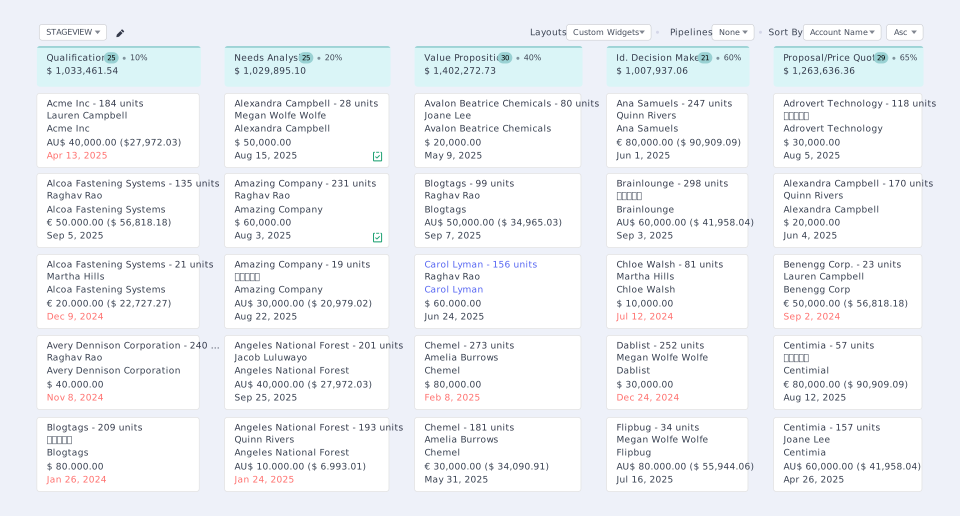
Source: Zoho CRM official website ↗Official product example, not a Zolution customer project. Interface and features may vary by edition and configuration.
Four ways to move forward
These are common starting points. We agree the deliverables and exclusions for your project after reviewing your requirements.
| Engagement | When it fits | Typical deliverables |
|---|---|---|
| Implementation | Starting with spreadsheets or introducing CRM for the first time? Translate your sales stages, responsibilities and handovers into a practical CRM setup. Agree the process before configuring it. |
|
| Optimisation | Already using Zoho CRM, but working around it? Identify where data, workflow or adoption breaks down. Focus the changes on the work your team needs to complete every day. |
|
| Migration | Moving from another CRM or consolidating disconnected records? Decide what to retain, clean and map before moving records. Test the migration and reconcile the results before the team switches. |
|
| Integration | Re-entering the same information across your systems? Define how information should move between CRM and the systems your team relies on. Confirm feasibility, ownership and exception handling before committing to a connection. |
|
We’ll help identify the right starting point.
Talk to a Zoho ConsultantZoho CRM + AI
Your CRM holds the history. AI can help turn it into a useful brief, a follow-up or a next action. Explore three ways to put them together.
Where does your team lose time?
Stop piecing together the customer story.
“Brief me for my next customer call.”
A meeting brief with the latest discussion, outstanding commitments and questions to raise.
Less preparation. A better-informed conversation.
Turn the conversation into a clear next step.
“Draft the follow-up and suggest the next task.”
A follow-up draft and proposed task, ready for the salesperson to check before sending or saving.
Less retyping. More consistent follow-through.
Find what needs attention before the sales meeting.
“Which open deals need attention this week?”
A shortlist of deals with overdue follow-ups or missing next steps, using the criteria your team agrees.
Less record checking. A more focused sales review.
CRM supplies the context. AI helps with the work. MCP connects an external AI assistant to supported CRM tools when needed. The right setup depends on your workflow and available features.
See the use cases and how it works ↗How we deliver
Understand your team, current process, data and constraints.
A shared understanding of what needs to change.Agree the workflow, responsibilities, scope and acceptance criteria.
A plan your team can review before configuration.Configure, connect and migrate, then test the agreed workflows.
A setup checked against real working scenarios.Train users and administrators, then refine the working process.
A clear handover and an agreed support approach.Planning your project
The work depends on your sales processes, customisation, data quality, integrations and training needs. Your budget should separate Zoho subscriptions, implementation work and ongoing support. We confirm the project scope before quoting.
Data preparation, integration access, decisions and user testing all affect delivery. We agree milestones after discovery, including time for your team to review the setup and test it before launch.
Nominate a process owner, explain your sales workflow and provide authorised access to the relevant systems and data. Your team reviews the design, resolves data questions and tests the agreed scenarios before approving the switch.
Agree user and administrator training, handover documentation and post-launch support in the project scope. Confirm the support period, response arrangements and how later changes will be estimated.
Explore training and support ↗Before the switch
Migration and integration are part of the operating process. We agree the boundaries and checks before moving into delivery.
Define the records, relationships and history to carry forward, then validate a trial migration with your team.
Agree the source of truth, sync direction, permissions and how failed updates will be handled.
Document responsibilities, administrator training and the agreed support and rollback arrangements.
Customer experience
See how a Singapore real-estate agency moved pipeline tracking and commission forecasts from spreadsheets into Zoho CRM.
Before we talk
Yes. We can begin with a review of the current configuration and the way your team uses it, then agree which changes should take priority.
Timing depends on your processes, data, integrations and availability for decisions and testing. We agree the scope and delivery plan after discovery rather than promise a standard duration.
We assess the available exports, record relationships, history and data quality first. The agreed migration plan defines what can move, what needs cleaning and how the results will be checked.
We review the required data flow, available interfaces, authentication and system constraints before confirming scope. Some requirements may need a custom connection or a different workflow.
Yes. Zolution is based in Singapore and serves overseas customers remotely. We agree meeting times, collaboration and delivery arrangements during discovery.
A short description of your sales process, current systems, main pain points and what you want to improve. If you already use Zoho CRM, tell us what is working and where your team gets stuck.
Start with your sales process
Tell us what you need. We'll reply within the same business day.