

Why Zoho CRM and AI work well together
AI can help your sales team prepare for calls, draft follow-ups and find deals that need attention. Zoho CRM gives it the customer history, deal context and responsibilities needed to make that help relevant.
A general AI chat often starts with you copying information into a prompt. Connecting AI to CRM can reduce that repeated preparation. The assistant can work with the records its tools and permissions allow, while your team checks the proposed response or action.
The combination is particularly useful for teams already working in Zoho: customer records, ownership and workflows provide a foundation for AI-assisted work. MCP, short for Model Context Protocol, is one way to connect an external AI assistant to that foundation. The following use cases show how this can help a sales team.
Walk into customer calls prepared
The problem: preparing for a call means opening notes, checking deals and asking colleagues what happened. A busy week or account handover makes it easy to miss a commitment.
With CRM and AI: request a briefing from the account history, recent notes and open deals. It can bring together the latest discussion, unresolved questions and suggested talking points, with references back to the records.
Example: before a renewal call, the brief highlights that the customer asked for a revised proposal, the delivery date is unresolved and a colleague promised an update. The account manager checks those points before the call.
The benefit: less time searching and a better-informed conversation, especially when another colleague takes over.
A meeting preparation example
Before: piece it together yourself
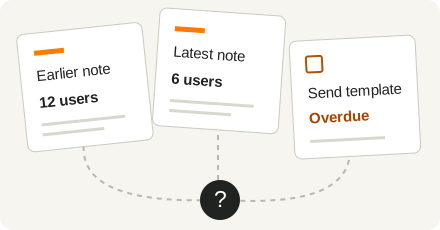
Status: Not Started.
You open the records, work out what changed and decide what to discuss.
With AI: start with a briefing
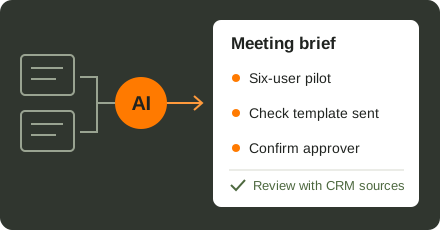
“Help me prepare for this customer meeting.”
Discuss the six-user pilot.
The template task is overdue. Check whether it was sent.
Ask who approves the budget.
Know what changed, what needs attention and what to ask.
Keep follow-ups moving after a meeting
The problem: the conversation is finished, but the follow-up email, CRM note and next task are still waiting. Details get retyped, and responsibilities can be lost between people.
With CRM and AI: use meeting notes and deal context to prepare a recap, draft a follow-up and propose the next task. An agent with the right tools can help carry out the CRM update after approval.
Example: a prospect asks for a revised quote by Friday. The assistant drafts a response and proposes a task for the deal owner, using the agreed deadline. The salesperson checks the promise and recipient before sending or saving.
The benefit: less repeated writing and more consistent follow-through. Review time goes into checking the commitment rather than recreating the conversation.
Find the deals that need attention
The problem: a pipeline report shows values and stages, but a manager still opens records to find missing next actions or overdue follow-ups.
With CRM and AI: define the exceptions you care about, then request matching deals with owners and record links. For example, look for open deals with no completed activity in 14 days and no future task.
Example: before the weekly sales meeting, review a shortlist of neglected opportunities. Owners can explain the exceptions and agree what to do next.
The benefit: a more focused pipeline conversation with less manual checking. A fixed rule may only need a CRM report or workflow; AI adds value when the team also needs to interpret the context or prepare an action.
Which AI tools can you use with Zoho CRM?
Choose the tool around the work your team needs to do. An AI agent combines instructions and tools to carry out several steps, such as reading a deal, preparing a recap and proposing a follow-up task.
Start with the work your team repeats
Choose one recurring task and compare the current process with a small pilot. Measure time spent preparing and correcting the output, and whether the right next action gets completed. Include the effort of checking the AI’s work.
Match the approach to your Zoho edition, data quality, permissions, available tools and running costs. Start with the records the task needs and agree which messages or record changes require approval.
Zolution can help you choose the AI approach, connect it to Zoho CRM and build it around your sales process. Bring a call that takes too long to prepare, a follow-up that gets delayed or a pipeline review that needs too much checking. Talk to us about the task you want to improve.
Sources
Product information as of 14 October 2026. Confirm the applicable edition and terms for your project.