

n8n vs Make vs Zapier: Best Automation Tool in 2026
Automation has become a core part of modern digital workflows. Businesses, marketers, and developers increasingly rely on automation tools to eliminate repetitive tasks, connect applications, and streamline data flows between systems.
Among the many workflow automation platforms available today, three tools dominate the conversation: n8n, Make (formerly Integromat), and Zapier. These automation tools allow users to connect different applications and automate processes such as syncing CRM data, sending notifications, generating reports, or orchestrating AI workflows.
Choosing the right automation tool can significantly affect productivity, operational costs, and the overall architecture of your workflows. In this guide, we’ll compare n8n vs Make vs Zapier in detail to help you choose the automation tool that matches your workflow, technical skills, and long-term automation strategy.
What Are Automation Tools?
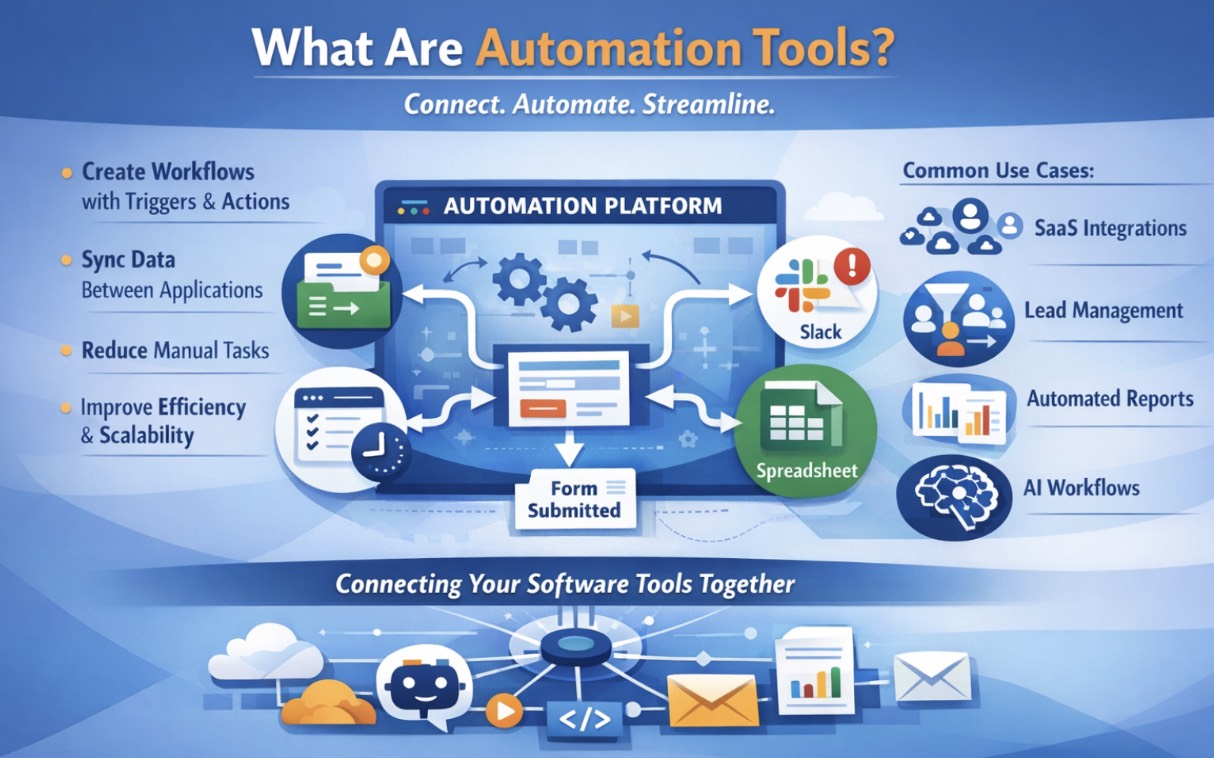
Automation tools are software platforms designed to connect different applications and automate repetitive tasks. Instead of performing the same process manually every day, users can create workflows where a trigger automatically initiates one or more actions.
For example, when a user submits a form on a website, an automation workflow might automatically send the data to a CRM, notify a sales team in Slack, and store the information in a spreadsheet.
These tools function as digital connectors between systems. By linking APIs and applications together, automation tools reduce manual work and allow businesses to scale operations more efficiently.
Common automation use cases include syncing data between SaaS applications, generating automated reports, managing lead pipelines, sending notifications, orchestrating AI workflows, and integrating internal systems.
How to Choose the Right Automation Tool for Your Business
Choosing the right automation tool depends on your workflows, technical skills, and the tools your business already uses. Platforms like n8n, Make, and Zapier all automate tasks and connect applications, but they are designed for different levels of complexity and technical expertise.
Key factors to consider when selecting an automation platform include:
- Workflow complexity: Simple automations vs multi-step workflows
- Ease of use: Whether your team is technical or non-technical
- Integration ecosystem: Compatibility with your existing tools
- Pricing model: Task-based vs operation-based cost structure
- Scalability: Ability to support growing automation needs
- Data control and hosting: Cloud-based vs self-hosted options
By evaluating these factors, businesses can choose an automation tool that fits their workflow requirements and scales as their operations grow.
Overview of n8n, Make, and Zapier
n8n
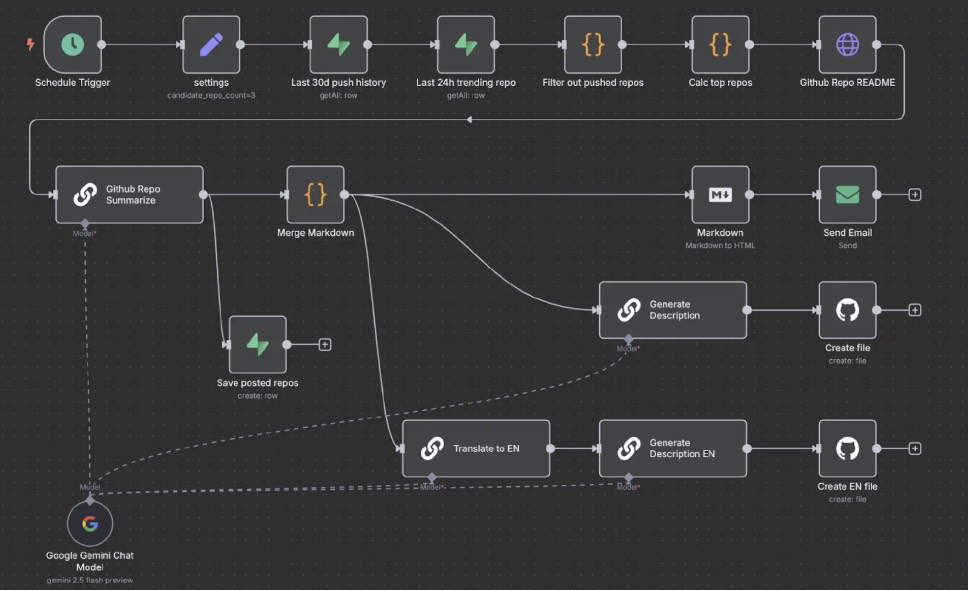
n8n is a workflow automation platform designed for flexibility and developer control. It uses a visual node-based editor where users can connect applications, APIs, and scripts to automate complex workflows. One of its key advantages is the ability to self-host the platform, giving organizations full control over infrastructure, security, and data management.
Because of its customization capabilities and support for custom code, n8n is often used by developers and technical teams building advanced automation pipelines, internal tools, or AI-driven workflows.
Make
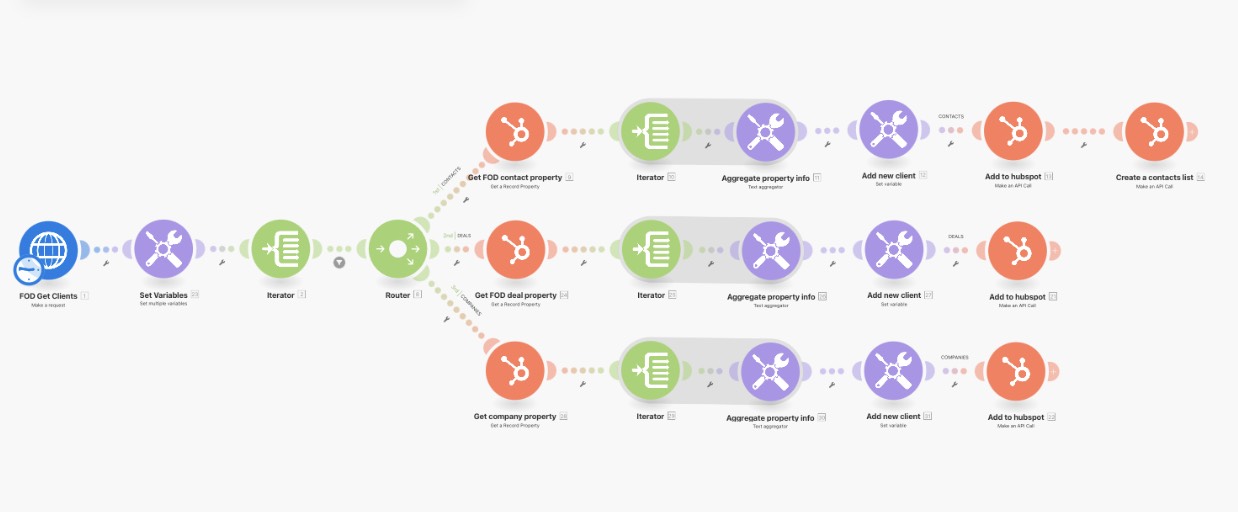
Make is a cloud-based automation platform known for its visual workflow builder. Instead of writing code, users create automation scenarios by connecting triggers and actions in a graphical interface that maps how data flows between applications.
This visual approach makes it easier to design complex workflows with branching logic, making Make a popular choice for automation specialists, marketing teams, and operations teams that want flexibility without coding.
Zapier
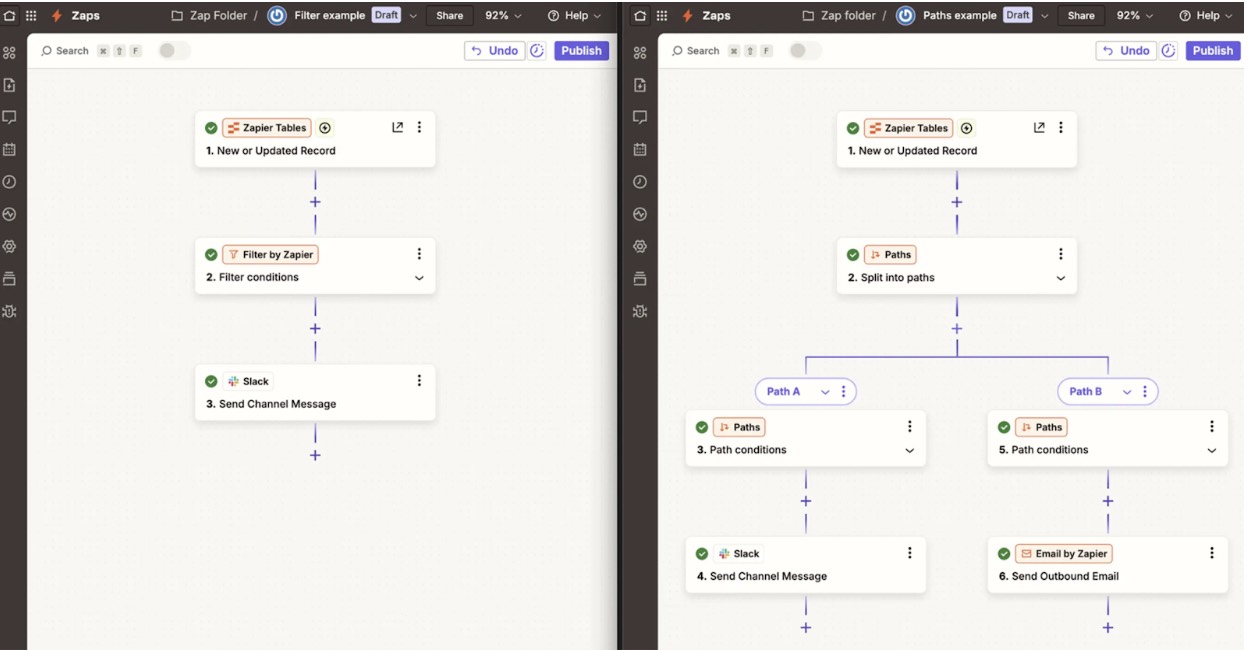
Zapier is one of the most widely used automation tools and is designed primarily for simplicity and ease of use. The platform allows users to connect applications and create automated workflows called “Zaps,” where a trigger in one app automatically performs actions in another.
Because of its large integration ecosystem and beginner-friendly interface, Zapier is often preferred by non-technical users and teams that want quick, reliable automation without complex configuration.
At-a-Glance Comparison: n8n vs Make vs Zapier
All three platforms automate workflows and connect applications, but they differ in pricing models, flexibility, integrations, and target users. The table below summarizes the key differences to help you quickly understand which automation tool might fit your needs.
Criteria | n8n | Make | Zapier |
Pricing Model | Per workflow execution | Per operation | Per task |
Typical Pricing | Free self-hosted; Cloud plans from ~$20/month | Free tier available; paid plans from ~$9/month | Free tier available; paid plans from ~$19.99/month |
Integrations | ~1,000+ native integrations | ~2,000+ integrations | 8,000+ integrations |
Self-Hosting | Yes (core advantage) | No | No |
Workflow Interface | Node-based workflow editor | Visual scenario builder | Simple trigger-action builder |
Coding Support | Full scripting and API flexibility | Limited scripting options | Limited code steps |
Error Handling | Highly customizable workflow handling | Advanced error handling tools | Basic retry and error control |
Best For | Developers and technical teams | Intermediate users and automation specialists | Beginners and non-technical users |
This comparison highlights the fundamental differences between the platforms. Zapier focuses on simplicity and massive integration coverage, Make balances flexibility with visual workflow design, and n8n provides deep customization and self-hosting capabilities for technical teams
Platform Breakdown: Features, Strengths, and Weaknesses
Below is a quick overview of n8n, Make, and Zapier, including a short description, key features, strengths, and limitations. Each automation tool serves different users depending on workflow complexity, technical expertise, and integration needs.
n8n
n8n is an open-source workflow automation platform designed for developers and technical teams that need maximum flexibility and control over their workflows. It allows users to build automation pipelines using a node-based interface and can be self-hosted for full control over infrastructure and data.
Key Features
- Node-based workflow builder
- Self-hosting or cloud deployment
- Custom API integrations and webhooks
- Support for scripting and advanced logic
- AI workflow orchestration capabilities
Strengths
- Highly customizable automation workflows
- Self-hosting provides full data ownership
- Powerful for API-driven automation pipelines
- Strong flexibility for developers and data teams
Weaknesses
- Steeper learning curve for beginners
- Requires infrastructure management if self-hosted
- Smaller library of native integrations compared to competitors
Overall, n8n is best suited for teams that want deep customization, strong API control, and the ability to build complex automation systems.
Make (formerly Integromat)
Make is a visual automation platform that allows users to design workflows using a drag-and-drop interface. It provides a flexible canvas where users can map out automation scenarios, making it easier to manage complex multi-step processes.
Key Features
- Visual workflow builder
- Conditional logic and branching workflows
- Data transformation and filtering tools
- Large library of app integrations
- Advanced scheduling and workflow monitoring
Strengths
- Highly visual workflow design
- Flexible automation logic and branching
- More affordable pricing compared to Zapier
- Suitable for complex multi-step automations
Weaknesses
- Interface can feel complex for beginners
- Requires time to learn advanced features
- Less developer-level customization than n8n
Make is often considered the middle ground between simplicity and flexibility, making it popular among automation specialists and operations teams.
Zapier
Zapier is one of the most widely used automation tools and is known for its simplicity and large integration ecosystem. The platform allows users to connect apps and create automated workflows called “Zaps,” where a trigger in one application performs actions in another.
Key Features
- Simple trigger-action automation builder
- Thousands of app integrations
- Built-in templates for common workflows
- Cloud-based infrastructure
- AI and automation assistants
Strengths
- Very easy to use for beginners
- Largest integration ecosystem among automation tools
- Fast setup for simple workflows
- Strong documentation and community
Weaknesses
- Pricing can become expensive as workflows scale
- Limited flexibility for complex automation logic
- Less control over infrastructure and data compared to self-hosted tools
Zapier is ideal for non-technical users, marketing teams, and businesses that want quick automation without needing coding or advanced configuration. Learn more about Zapier Automation
Conclusion: Choose the Platform That Fits Your Needs
Workflow automation helps businesses streamline processes, reduce repetitive manual work, and improve efficiency across teams. By connecting different applications and automating tasks, companies can save time, reduce human error, and allow employees to focus on more strategic work.
When comparing n8n, Make, and Zapier, the best choice depends on your workflow complexity and technical expertise. Zapier is ideal for quick and simple automations, Make offers flexible visual workflows for more advanced processes, and n8n provides powerful customization and infrastructure control for technical teams. Choosing the right platform ensures your automation system can support both your current workflows and future growth.
If you’re exploring automation but are unsure which platform fits your business, our team can help. Schedule a free consultation with us to learn how automation tools like n8n, Make, or Zapier can streamline your workflows and improve operational efficiency.
Frequently Asked Questions About Zapier vs Make vs N8N
1. What is the difference between n8n, Make, and Zapier?
The main difference lies in their approach to automation. Zapier focuses on simplicity and ease of use, Make provides a powerful visual workflow builder with flexible logic, and n8n offers the most customization with self-hosting and developer-level control.
2. Which automation tool is easiest for beginners?
Zapier is generally considered the easiest automation tool for beginners because it offers a simple interface, pre-built templates, and thousands of ready-to-use integrations that allow users to create workflows quickly without technical knowledge.
3. Is n8n really free to use?
Yes, the self-hosted version of n8n is free and open-source under a fair-code license. Users only need to pay for the server infrastructure if they host it themselves, while n8n Cloud offers paid plans for managed hosting.
4. Which platform has the most integrations?
Zapier currently has the largest integration ecosystem with over 8,000 applications available. Make offers thousands of integrations as well, while n8n has fewer native integrations but allows connections to almost any API through HTTP requests or custom nodes.
5. Is Make better than Zapier?
It depends on the use case. Make offers more advanced workflow logic and visual automation capabilities, while Zapier is easier to use and better suited for simple automations or beginners.
6. When should you use n8n instead of Zapier or Make?
n8n is best used when you need full control over infrastructure, want to self-host your automation platform, or require advanced customization such as API orchestration, scripting, or AI-driven workflows.
7. Which automation tool is the cheapest?
In many cases, n8n is the cheapest option if self-hosted because the software itself is free. Make offers relatively affordable cloud plans, while Zapier can become expensive as the number of tasks or automation steps increases.
8. Can businesses use multiple automation tools together?
Yes, many companies use multiple automation platforms depending on the use case. For example, Zapier may handle simple SaaS integrations while Make or n8n manages more complex workflows or high-volume automation pipelines.
9. Do you need coding skills to use these automation tools?
Not necessarily. Zapier and Make are designed as no-code or low-code platforms that allow users to build workflows visually. However, n8n offers more powerful customization and scripting features, which are better suited for developers or technical teams.
10. Which automation tool is best for scaling workflows?
For simple automations at small scale, Zapier works well. For more complex workflows with advanced logic, Make is often preferred. For large-scale automation pipelines or systems requiring full infrastructure control, n8n can provide the most flexibility and scalability.